
Why your website loads at head office and fails in China
Your website loads fine in Chicago. It loads fine in Munich. Your China distributor says it hangs.
Both reports are accurate.
Western B2B sites break in China one font, one tag, one embed at a time. A contact form waits on a script that never arrives. A product page freezes while the browser keeps requesting a font from a server it can't reach. Every dashboard at head office stays green, because every test runs from an office outside China.
When did someone last open your site from Shanghai?
Take yourcompany.com, a fictional industrial equipment maker. Two weeks before a Shanghai trade show, its China distributor sends an email. The contact form never appears. Product pages hang halfway through loading. Booth visitors will scan a QR code, land on those pages, and leave.
The marketing team in the US opens the site. Everything works. The web agency runs a speed test from a US data center. Everything passes. The distributor sends screenshots of a blank form. The thread goes nowhere for a week.

The reviewed guides on China site speed agree on one point. You have to test from inside China and not only from the US or Europe. Most teams only learn to do that after a complaint.
The complaint tends to arrive at a predictable moment:
- A China site launch
- A trade show in China
- A new distributor
- A complaint from the local team
Each one puts real buyers on your pages, often for the first time, and often on a deadline.
dminorstudio built the China Load Risk Scanner for that moment. As of this launch it is open to everyone and free. You don't need a beta signup, a waitlist, or an invite. You get a risk score and the top issues without signing up. The full report asks for a work email.
This guide covers three things:
- Why it happens: the third-party services that are slow, unreliable, or blocked in China, and how one bad request can freeze a whole page
- Which resources cause it on your page: the specific fonts, tags, forms, and embeds, including the ones hidden inside tag managers
- How to fix it: a China-safe fix plan you can hand to a developer
Loading is only half the job. A page that loads in Shanghai still has to show up when a buyer searches Baidu, and most Western sites miss the basic signals Baidu looks for. The scanner scores those separately, and this guide walks through each one.
We have spent 9 years working in China, building China-ready websites for global B2B companies. The patterns in this guide come from that work.
The fonts, tags and embeds that break websites in China
One font. One tag. One embed. A Western site rarely goes dark in China as a whole domain. It stalls on third-party services borrowed from Google, US SaaS vendors and public CDNs, and many of those are slow, unreliable or blocked behind the Great Firewall.
A failed request can do more than slow a page down. If a stylesheet or synchronous script sits in the
, the browser holds back the first paint until that file arrives or the request times out. A blocked resource that feeds a footer widget breaks the footer. A blocked resource on the critical path leaves a white screen or a page frozen halfway through loading.The usual culprits, and what a China visitor sees:
- Google Fonts → text stalls while the page waits on the font stylesheet
- reCAPTCHA → the contact form never appears, or won't submit
- YouTube → an empty black box where the product video belongs
- Google Maps → a blank grey panel on the "find a distributor" page
- jsDelivr → scripts fail at random, so menus and sliders break on some visits
- HubSpot forms → lead capture depends on a script that may never load
- Intercom → the chat bubble hangs and drags page load with it
- Google Analytics → China sessions don't reach your reports
Only one service on that list is labeled blocked. GreatFire.org's tests show Google Analytics as blocked in China, with every recent conclusive test failing. The rest are commonly blocked or unreliable, and results vary by endpoint and protocol. GreatFire's recent jsDelivr results show 12 URLs blocked, 74 intermittently disrupted and 60 normal out of 148 tested. A file can work at 10am in Beijing and fail at 3pm in Chengdu.
The scanner checks 22 services across 13 categories: fonts, analytics and tags, forms, video, maps, JavaScript libraries and CDNs, advertising, sign-in, backend services such as Firebase, social embeds, chat, images such as Gravatar, and translation.
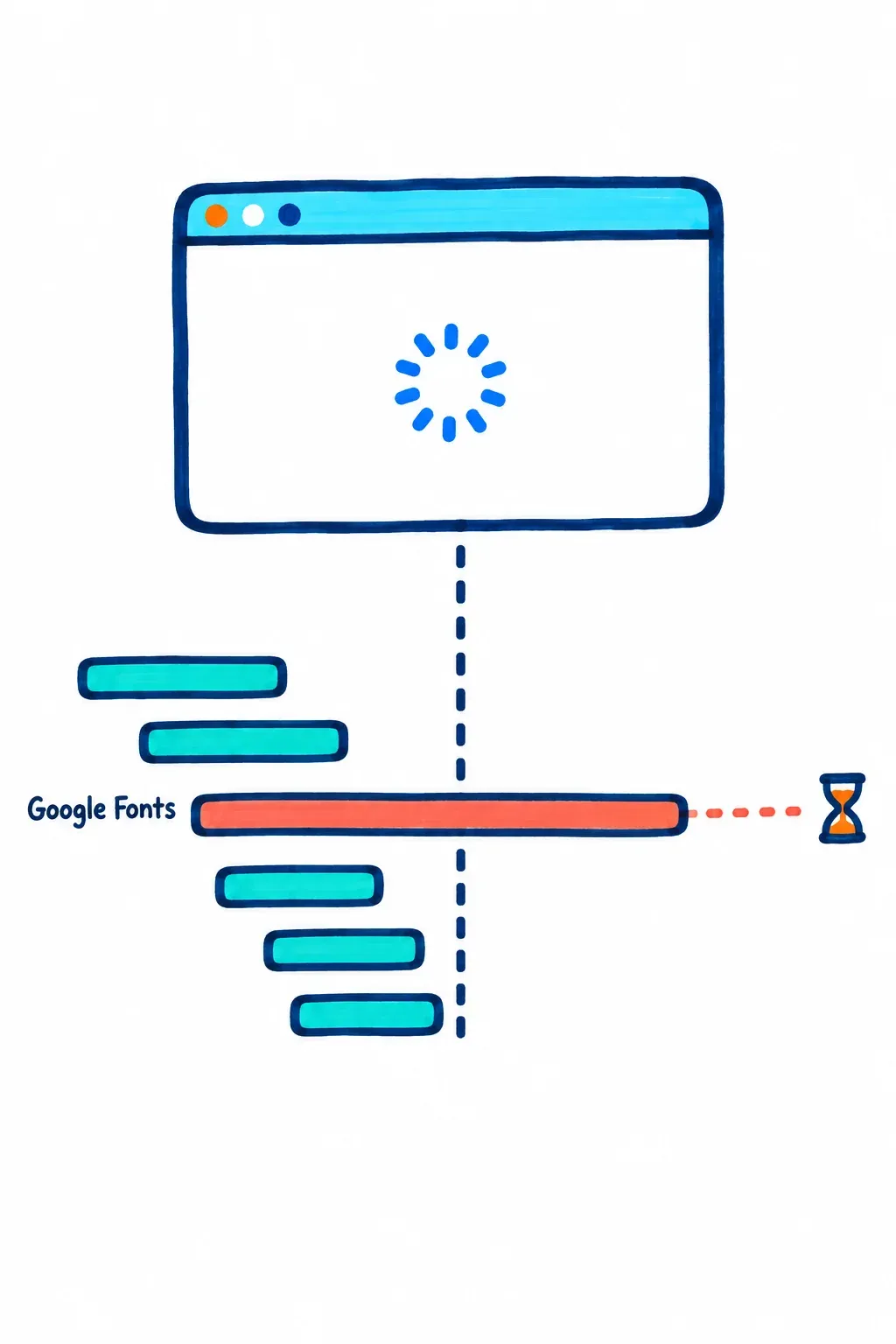
Google Tag Manager hides the worst of it. GTM itself loads in China, so a team that checks the container sees it fire and closes the ticket. The container then requests GA, the Meta pixel, TikTok, Hotjar, Microsoft Clarity and OneTrust, each from its own domain, so you have to test each vendor endpoint separately. Most teams never do. The scanner reads public GTM containers and rates each tag against GreatFire.org test data.
Search this topic and you'll find lists of banned apps, firewall test tools and proxy websites. Is Instagram banned? Is WhatsApp? GreatFire's October 2026 tests list both as blocked, and your China buyers already work around that. A B2B site has a different problem. A buyer opening your page from an office network, or from a QR code at a trade show booth, sees no obvious error. They see a form that won't load, and they don't email you about it.
That's what happened at yourcompany.com. Its contact form loads reCAPTCHA. Its headings pull Google Fonts from a render-blocking stylesheet. Its GA tag sits inside GTM, where the team never looked. Those three resources explain the distributor's screenshots, and fixing them is routine work for a team that builds B2B websites for China.
Which of these is loading on your pages right now?
How China visitors reach your server, and what to do about it
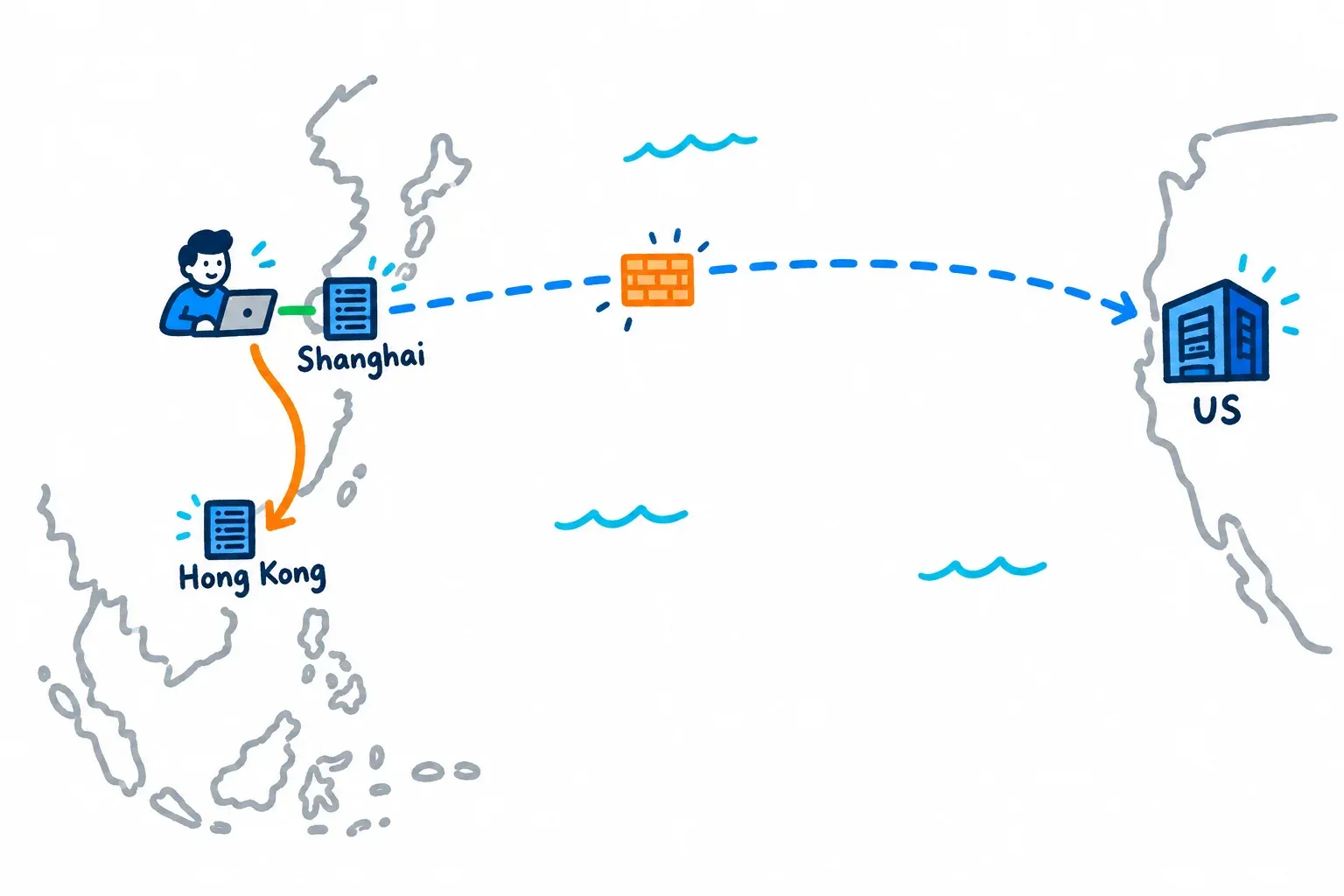
Hosting is the second cause, after the third-party resources above. Every request from a buyer in Shenzhen to a server in Virginia crosses the Great Firewall and then an ocean. The longer that route, the more room for delay and dropped packets, and the worse the swings by carrier and time of day.
The scanner's hosting check compares DNS answers from Chinese and Western public resolvers and reports one of three outcomes. China visitors are routed inside China, nearby (Hong Kong, Macau or Taiwan), or outside.
A "global" CDN often lands in the third bucket. Many global CDNs have no nodes inside China at all, so Chinese visitors get served from overseas edges, with the latency and reliability problems that follow. China coverage from the big providers is a separate product. Cloudflare's China Network runs on JD Cloud infrastructure and requires valid ICP information, and Akamai lists an ICP license among its China CDN prerequisites.
The choices for a B2B firm:
- Overseas hosting → no ICP needed, longest route, most exposure to firewall slowdowns
- Hong Kong or Singapore → closer, no ICP, a sensible middle ground
- Inside China → shortest route and the best speed for Chinese visitors, but ICP and a local entity needed
My view after nine years working in China: if China is a market you sell into through distributors and trade shows, fix the third-party resources first and move hosting to Hong Kong or Singapore. That covers most of the gain for a fraction of the effort. If you have a Chinese entity, a local sales team and plans for Baidu ads, host inside China.
ICP comes in two forms. An ICP filing covers non-commercial, informational sites. An ICP license is for sites that sell goods or services online. Cloudflare notes that getting an ICP number typically takes four to eight weeks, depending on site type and province, and Alibaba Cloud puts a commercial ICP license at about 60 days. Foreign companies generally need an eligible Chinese business presence to apply, and provincial rules vary. Cost depends less on fees than on whether you already have a Chinese entity, whether your CMS and assets need rework to run on Chinese cloud hosting, and who handles the filing paperwork.
Testing from inside China takes more than one method. Ask your local team or distributor to load key pages on office Wi-Fi and on mobile data from two carriers, and to record a screen video. Remote services fill the gaps. 17CE runs HTTP tests from regions across China, and BOCE checks speed, DNS, routing and domain blocking from Chinese and overseas nodes. Treat synthetic probes as signals, since they don't reproduce every user's browser.
The scanner's DNS comparison has limits too. It shows where Chinese resolvers send visitors. It can't prove page speed, blocking or packet loss on every Chinese ISP. Use it to catch a routing mistake fast, then confirm with real tests.
yourcompany.com is hosted in the US behind a global CDN, and the team assumed that meant global coverage. Chinese resolvers return a US edge, so the scanner reports "outside." Every distributor visit makes the full trip across the Pacific before the blocked fonts and reCAPTCHA even start to load.
Seven Baidu SEO checks to run after your site loads in China
A page that loads in China can still be invisible there. Most "website loading in China" guides stop at speed. Your buyers search on Baidu, and Baidu reads different signals than Google. The scanner scores seven Baidu SEO basics separately from the load risk score:
- Lang tag. Chinese pages need lang="zh-CN" on the element. An English tag on Chinese content sends Baidu a mixed signal about who the page is for. Pair it with simplified Chinese titles, meta descriptions and keywords.
- zh-CN hreflang. This tells search engines which URL is the Chinese version of an English page. Evidence that Baidu uses hreflang is thin, so treat it as good housekeeping that also helps Google route Chinese speakers. It is not a confirmed Baidu ranking fix.
- Baidu site verification. Baidu's Search Resource Platform has a site verification workflow. Without it, you can't submit sitemaps or see how Baidu crawls you.
- Baidu Tongji. This is Baidu's analytics tool. It covers traffic sources, conversion tracking, heatmaps and visitor flow, plus event analysis and API data export. It is also the practical answer to the Google Analytics gap from earlier. If GA is blocked for your China visitors, Tongji is where you see their visits.
- Robots.txt rules for Baiduspider. Baidu's crawler is Baiduspider. Your Allow and Disallow rules decide what it can crawl, and an overly broad block can shut out both PC and mobile crawlers.
- XML sitemap. Baidu's process is to host the file, verify the site, then submit the sitemap URL. Keep each file under 50,000 URLs and 10 MB. We've worked on sites with no sitemap at all, and building one was an early step in a Baidu SEO project that grew organic traffic.
- ICP number display. Sites with an ICP filing or license show the number in the footer. It is a compliance item for sites that hold one. Sites hosted outside China can still rank without it, so the scanner flags it as a signal and does not treat it as a hard requirement.
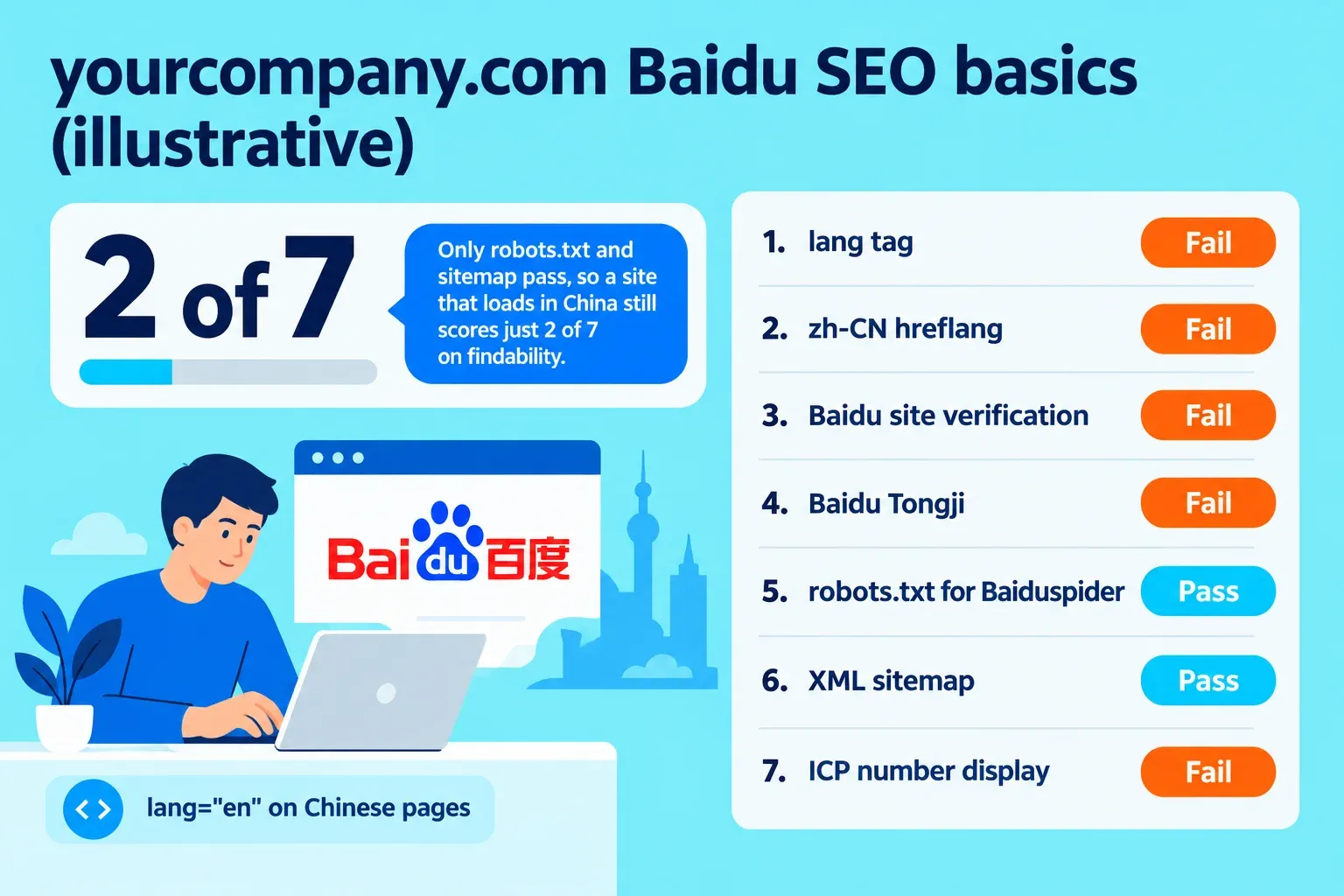
Here is how yourcompany.com does in this illustrative scan. Its robots.txt allows Baiduspider, and it has a sitemap, so those two checks pass. Its Chinese pages carry lang="en". There is no zh-CN hreflang, no Baidu verification, no Tongji and no ICP number. That gives a score of 2 of 7.
The distributor's Baidu searches for the product category come back without yourcompany.com. The head office team has no data that shows it, because GA records nothing from China.
How to scan your site with the China Load Risk Scanner
The tool is open now, free, with no beta list and no signup to see your first results. Start at the China Load Risk Scanner and pick one of three ways in:
- Enter a URL → the scanner fetches the page, opens linked CSS files (one level of @import) and iframes, and finds fonts and embeds hidden one layer down.
- Paste the page HTML → useful for staging sites or pages you can't expose to an outside fetch.
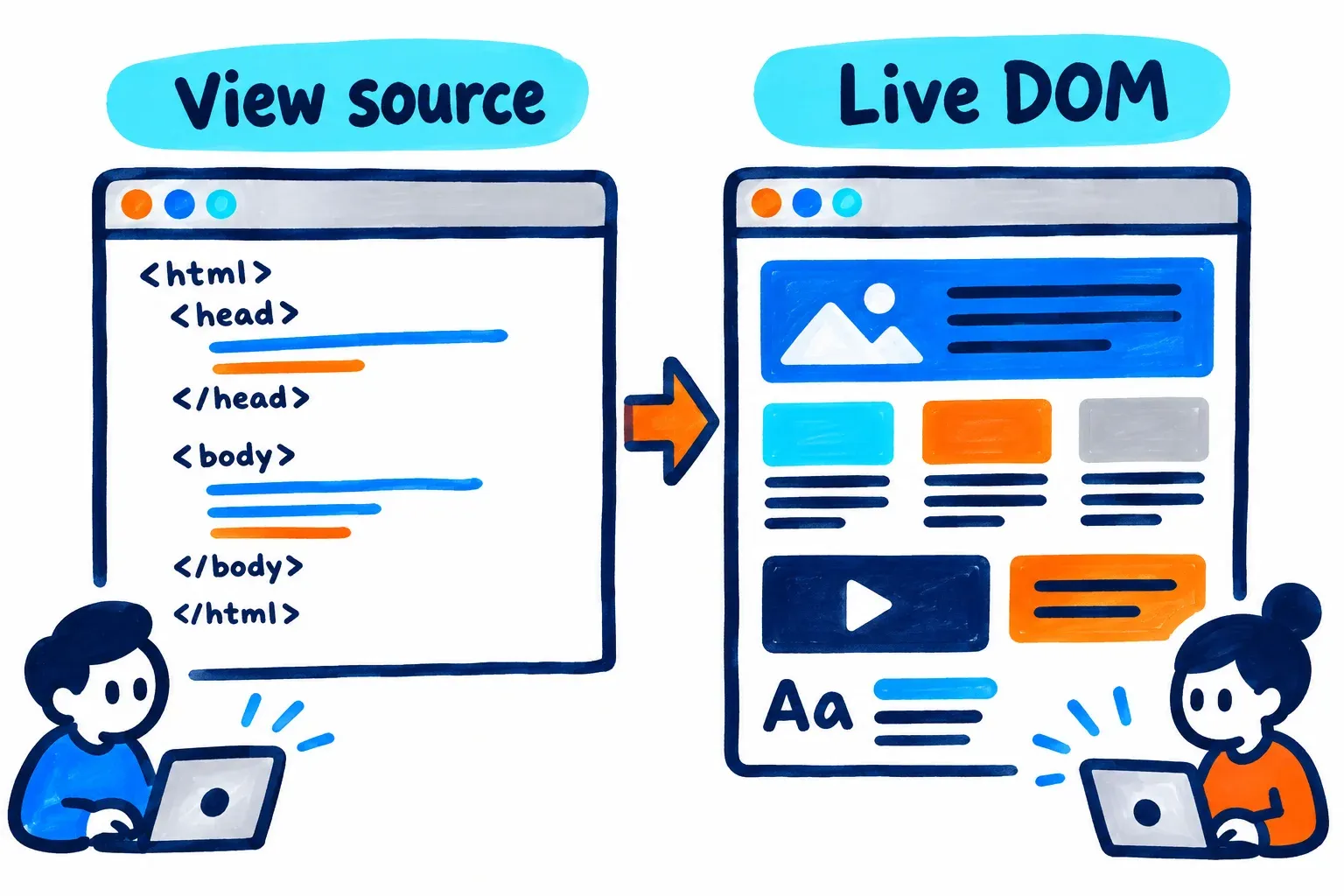
- Use the bookmarklet → click "China risk scan" on a fully loaded page. It reads the page as it stands after scripts run, so it catches late-loading tags and pages behind a login.
The bookmarklet exists because the live DOM can differ from the initial HTML once JavaScript adds nodes. A tag that GTM injects three seconds after load will never appear in view-source. The bookmarklet captures one moment in the page's life. It does not monitor the network over time.
What the score and report show
Every scan returns a 0 to 100 China load risk score in one of four bands: Low, Moderate, High or Critical. Three factors set the weight of each issue. Severity is one. Whether the asset is render-blocking is another. The third is how often it appears on the page. A render-blocking Google Fonts call in the
counts for more than a social share button in the footer.You see the top 3 issues free. For yourcompany.com, those are the reCAPTCHA script on the contact form, the Google Fonts stylesheet, and the GA tag inside GTM.
Click "Get my free full report" and enter a work email to unlock the rest:
- Every issue, with the exact HTML lines and a China-safe alternative
- Copy-paste fix code, plus a Copy all fixes button for your developer
- A fix plan grouped by effort: quick wins, needs a developer, and needs China hosting or an ICP license
Each group carries labelled hour ranges. Treat them as planning estimates for scoping a sprint. They are not a quote, and your developer's numbers will depend on your stack.
The report also includes the hosting and CDN check from earlier, which shows whether China visitors land inside China, nearby or outside. It also has the separate 7-point Baidu SEO score. Each rule shows its source and the date it was last reviewed, so you can see when a "commonly blocked" rating was last checked against GreatFire.org data.
We built the tool so it loads in China itself. It uses no web fonts and no render-blocking third-party scripts. Your China team can run it from Shanghai and send the results to head office.
Privacy
- Scanning runs in your browser.
- Pasted HTML never leaves it.
- URL mode does not store the page HTML.
- The bookmarklet logs only the URL and the score.
- The hosting check queries public DNS resolvers and never contacts the scanned site.
Run your scan
dminorstudio helps global B2B companies win in China. Our work covers China-ready website development, CDN and hosting setup, Baidu SEO and SEM, and WeChat marketing. We have spent 9 years working in China, and we built this scanner from the issues we kept finding on client sites.
- Run a free China risk scan
- Want help with the fixes? Book a discovery call or email [email protected]
Results are for reference. Network conditions in China change often and vary by region and carrier, so a resource that loads in Shanghai on one carrier may stall in Chengdu on another.
What would your distributor find if they opened your site today?
Sources
- Why Is My Website Slow in China?, Chinafy
- China Load Risk Scanner, dminorstudio
- Optimize resource loading, web.dev
- Is analytics.google.com blocked in mainland China?, GreatFire
- GreatFire: jsdelivr.net domain results, GreatFire
- WordPress Plugins That Break in China, ChinaWebFoundry
- China Network FAQ, Cloudflare
- Get Started with China Network, Cloudflare
- China CDN Prerequisites, Akamai
- ICP Requirements, Cloudflare
- How to Get the ICP License in China, Alibaba Cloud
- ICP Filing Information, Tencent Cloud
- 17CE Website Testing, 17CE
- 拨测: 免费的域名检测工具网, BOCE
- How to localize your Drupal website for Chinese market, dminorstudio
- Baidu Search Resource Platform site verification guidance, Baidu Search Resource Platform
- Baidu Tongji products, Baidu Tongji
- Baidu Tongji help article, Baidu Tongji
- About Baiduspider, Baidu Search
- Baiduspider robots.txt guidance, Baidu Search Resource Platform
- Baidu Sitemap requirements, Baidu Search Resource Platform
- Baidu SEO Expertise - 5X Organic Traffic Growth for B2B China in 7 Months, dminorstudio
- View and change the DOM, Chrome for Developers
About The Author

Stephen Tseng
Co-founder of dminorstudio. regularly writes about the intersection of AI, SEO, and B2B growth strategy.